
Disclaimer: For official travel requirements, always refer to the local government transport department of your destination.
To check road conditions for a trip, the most effective method is using the Google Maps Traffic Layer for live congestion or Waze for community-based reports on road closures and accidents. For long-distance planning, checking current road conditions via official government 511 portals ensures you have the latest data on weather road conditions, and seasonal pass openings.
1. Use the Google Maps Traffic Layer for Real-Time Updates
Google Maps remains the primary tool for getting traffic updates and monitoring road conditions near me while on the move. It aggregates data from millions of users to provide a live road conditions map.
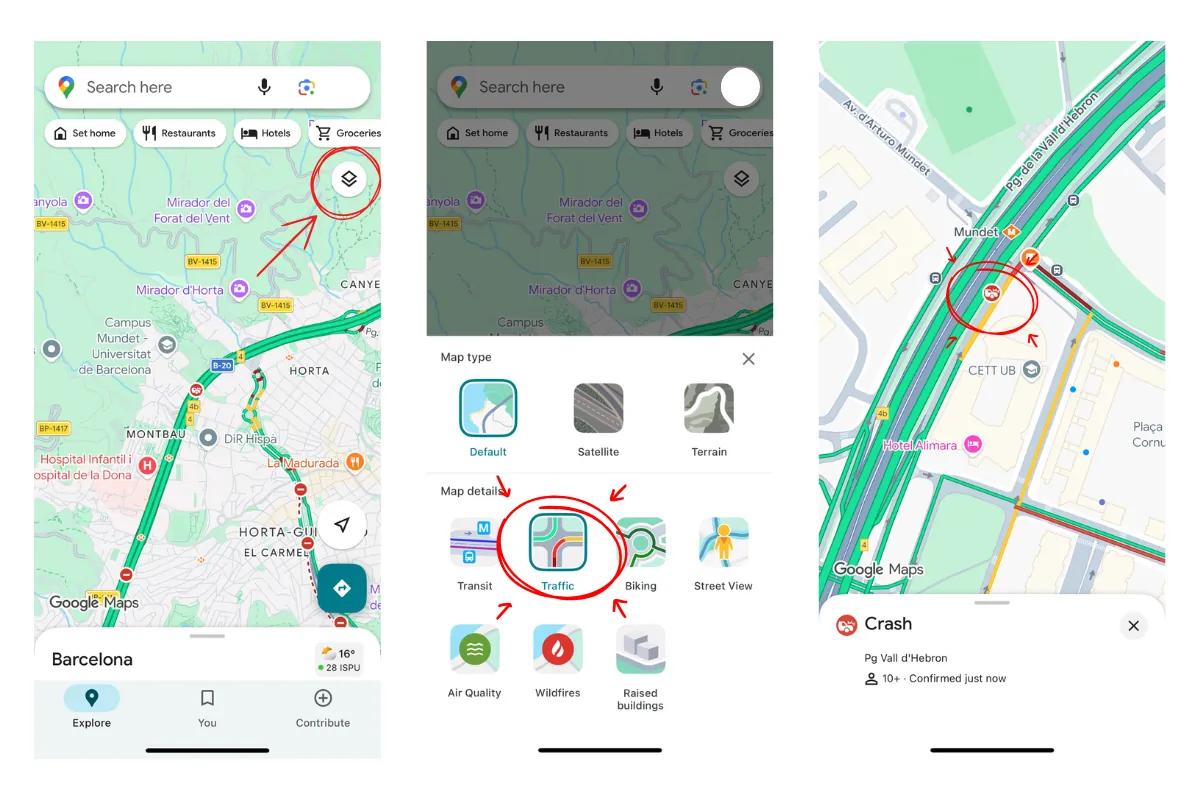
- Open Google Maps and tap the Layers icon.
- Select Traffic to overlay live speed data on your route.
- Green lines indicate clear paths, while red or burgundy lines signal heavy highway conditions or standstills.
- Look for specific icons indicating construction or crashes to understand why a route is delayed.
2. Predict Future Closures with Set Depart Time
When planning for a future date, especially during winter, you must account for winter road conditions that can lead to permanent seasonal closures.
- Enter your destination and select the menu (three dots).
- Choose Set depart or arrival time and pick your travel date.
- If a road is historically inaccessible due to snow, Google will show a road closures warning, helping you avoid a dangerous road condition map mistake.
3. Leverage Waze for Community Hazards
Waze is superior for identifying current road conditions near me because it relies on active driver reports. It is particularly useful for detecting driving conditions today that algorithms might miss, such as a sudden pothole or debris.
- Users report hazards like stalled vehicles or police checkpoints in real-time.
- It provides the most accurate live road conditions by allowing drivers to confirm or deny the presence of a hazard as they pass it.
4. Consult Official Government Portals
For the most authoritative information on highway conditions and government-mandated road closures, official portals are essential. These are often called 511 systems in North America but exist globally under various transport department names.
- Search for "[Country] official road conditions app" or portal to find government-verified data.
- These sites provide precise details on planned maintenance and long-term road condition map changes that third-party apps might not prioritize.
Get Eskimo eSIM to stay connected globally
Need internet while travelling? Here's what we recommend:

Fixed data plans
- No speed reduction
- No expiry, keep your data forever
- Transfer data to anyone
- Personal hotspot


5. Investigate Physical Signs with Street View
Checking a road conditions map is helpful, but seeing the physical environment provides the most confidence for a road trip.
- Drop the Street View pegman on intersections in mountainous or rural areas.
- Look for permanent signs that indicate seasonal closures or weight limits.
- If the latest imagery was only taken in summer, it is a strong indicator of difficult winter road conditions that make the road inaccessible half the year.
Essential Tools for a Road Trip Abroad
Good navigation isn’t just about directions; it’s about having the right tools to stay informed. Most drivers combine a few tools depending on the situation:
- Google Maps, Waze, or Apple Maps for real-time navigation.
- Offline maps downloaded in advance for weak-signal areas.
- Fuel or charging apps for long highway routes.
- Connectivity via an eSIM to ensure live data loads without delay.
More about a road trip abroad: What You Need for a Road Trip Abroad.
Stay Connected with Eskimo
Maintaining a live road conditions map requires a constant data connection. Relying on local Wi-Fi or expensive roaming can leave you stranded when traffic updates matter most.
Eskimo provides a seamless way to stay connected in over 80 countries. With an Eskimo eSIM, you can cross borders without swapping physical SIM cards, ensuring your maps always have the latest current road conditions. New users can even start with a free global eSIM trial with 500MB to test the network before committing to a full plan.
Benefits include:
- Global coverage: Works automatically in 100+ countries.
- Data rollover flexibility: Keep unused data for future trips.
- Extended 2-year validity: Stay connected long-term without reactivation hassles.
FAQs
Does Google Maps show road closures automatically?
Yes, Google Maps updates road closures based on a mix of official data and user GPS speeds. However, for the most immediate live road conditions, Waze often has faster reports from drivers on the ground.
How do I check road conditions for a trip in winter?
The best way is to use the Set Depart Time feature to check for historical winter road conditions. You should also consult the official road conditions app for the specific region to see if snow chains or 4WD are required.
Can I check road conditions offline?
Standard offline maps do not show live traffic updates or current highway conditions. You must have an active data connection, such as an Eskimo eSIM, to receive real-time alerts.
Why is my road condition map not showing traffic?
Ensure that the Traffic Layer is toggled on in your app settings. If you are in a very remote area, there may not be enough active users to generate a live road conditions near me report.