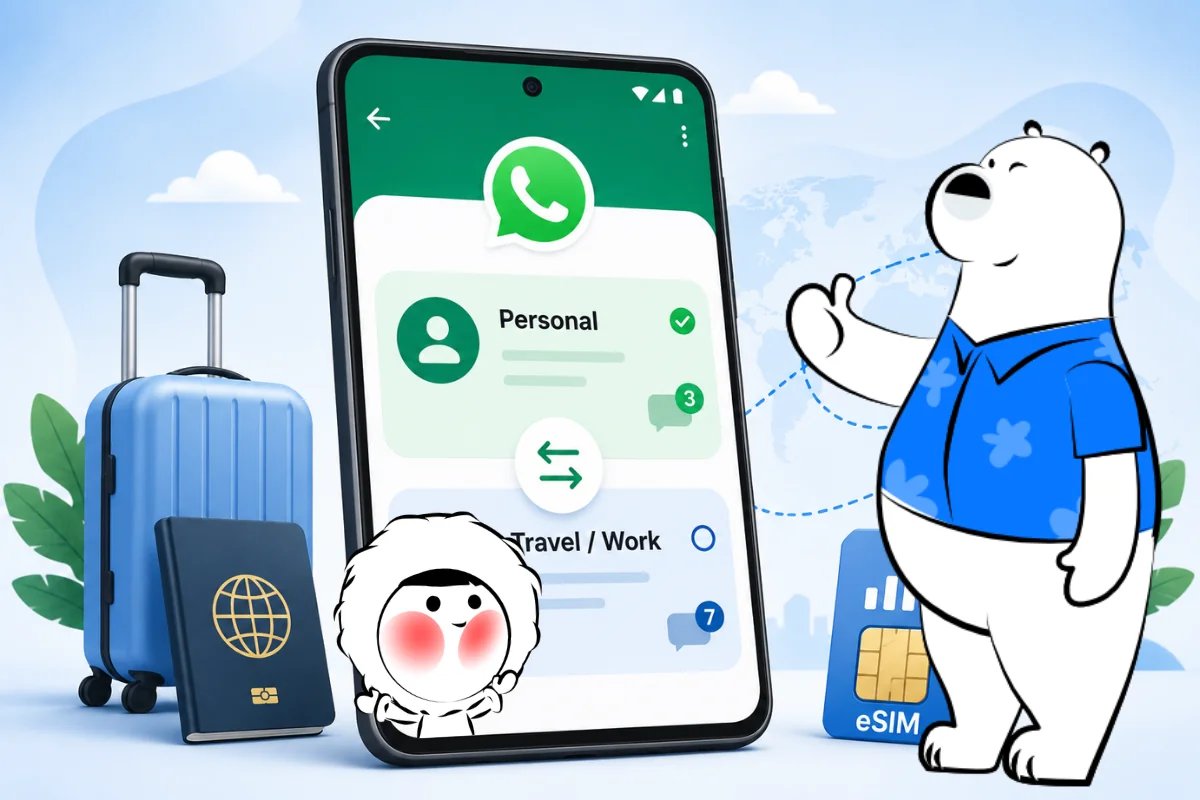
Yes, you can use two WhatsApp accounts in one WhatsApp app on Android. WhatsApp’s official Add Account feature lets you keep two accounts logged in on the same Android phone, as long as each account has its own phone number.
| Question | Answer |
| Can you use two WhatsApp accounts in one app? | Yes, on Android |
| Do you need two phone numbers? | Yes |
| Do you need WhatsApp Business? | No |
| Do you need app cloning? | No |
| Can a data eSIM keep WhatsApp online abroad? | Yes, but it may not provide a new phone number |
What “Two WhatsApp Accounts in One App” Means
This setup means one Android phone, one WhatsApp app, and two WhatsApp accounts.
It is not the same as using WhatsApp and WhatsApp Business as two separate apps. It is also not app cloning, Dual Messenger, or a modified WhatsApp app.
With the official Android setup, both accounts stay inside the regular WhatsApp app. You can switch between them without logging out, uninstalling the app, or carrying a second phone.
What You Need Before Setup
To add a second WhatsApp account in the same app, you need:
- An Android phone
- The latest version of WhatsApp
- A second phone number
- A second SIM, dual SIM, multi-SIM, or eSIM setup that can receive verification
Each WhatsApp account must be linked to a different phone number. This setup is for two accounts inside the regular WhatsApp app, not WhatsApp Business or app cloning.
A travel eSIM is usually data-only, so it can help keep WhatsApp online while abroad, but it may not provide a new phone number for WhatsApp verification.
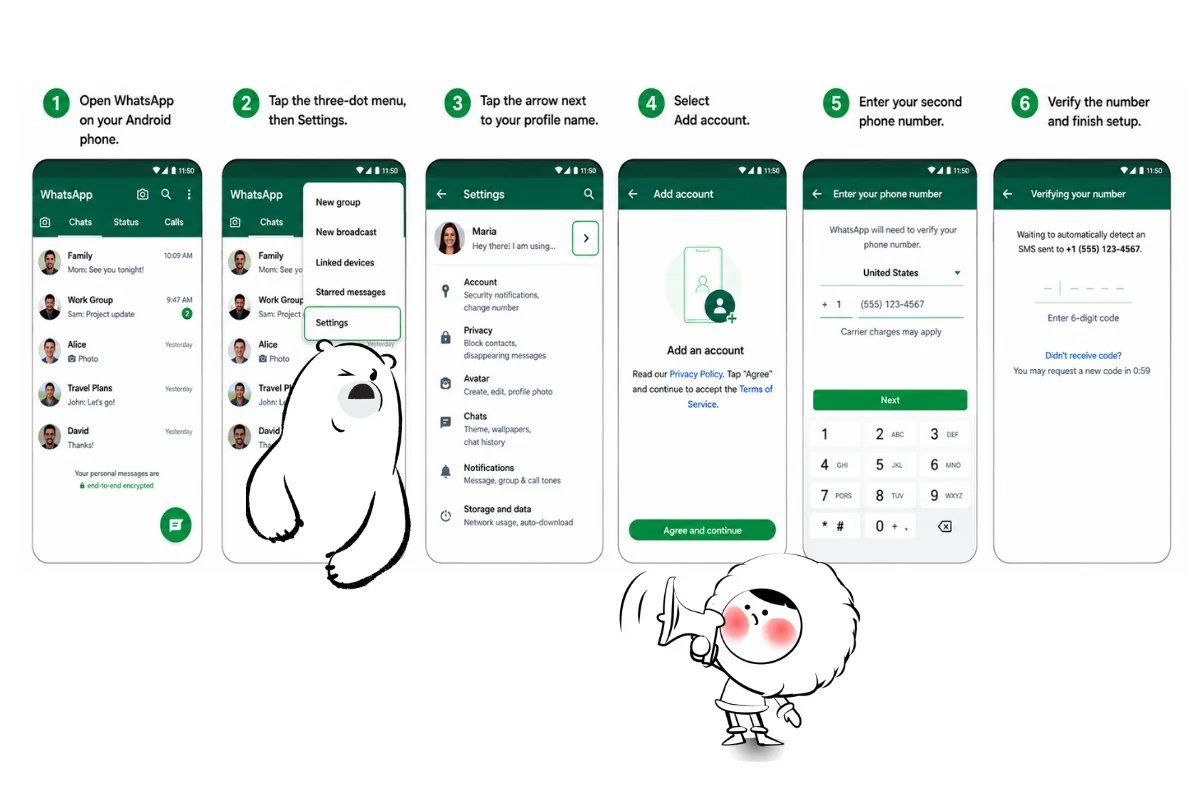
How to Add a Second Account in One WhatsApp App on Android
Follow these steps:
- Open WhatsApp on your Android phone.
- Tap Settings.
- Tap the arrow next to your name.
- Select Add account.
- Enter your second phone number.
- Verify the number and finish setup.
After setup, both accounts remain available inside the same WhatsApp app. You can use one account for personal chats and another for work, travel, or a separate mobile number.
Get Eskimo eSIM to stay connected globally
Need internet while travelling? Here's what we recommend:

Fixed data plans
- No speed reduction
- No expiry, keep your data forever
- Transfer data to anyone
- Personal hotspot


How to Switch Between WhatsApp Accounts
Once your second account is added, you can switch between accounts inside WhatsApp without logging out.
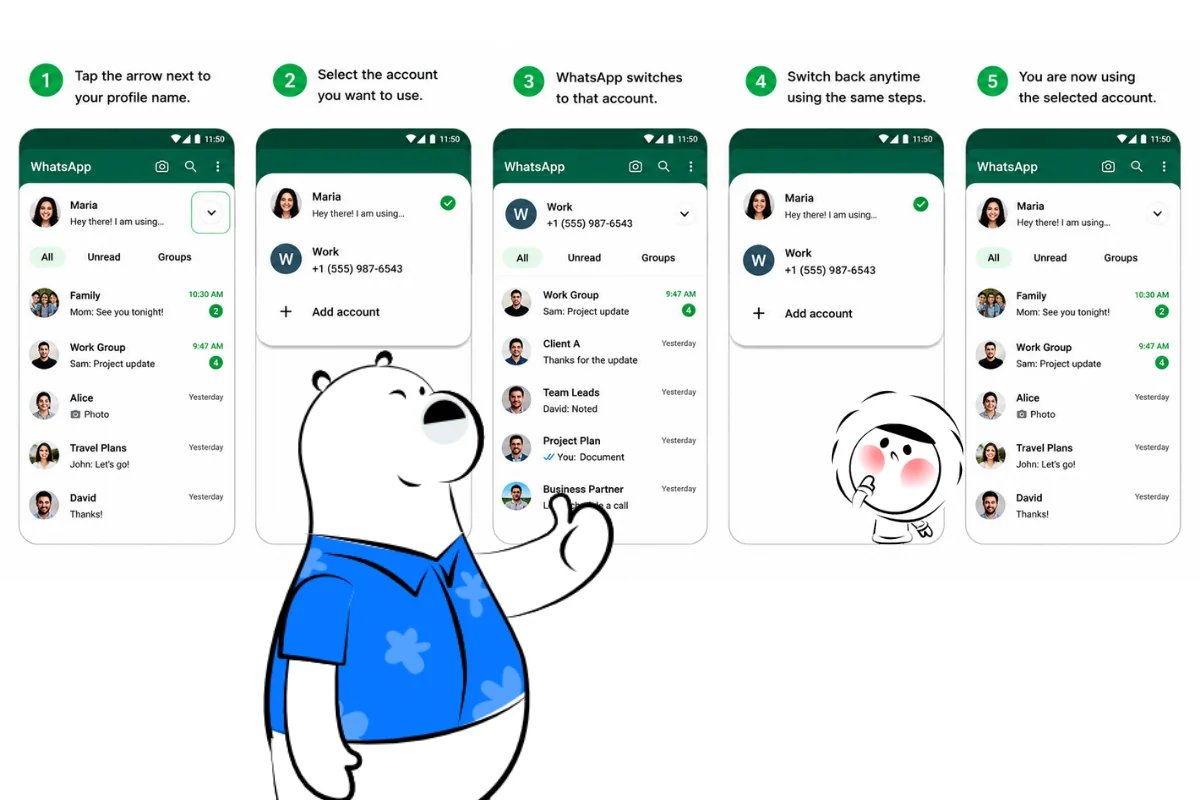
Follow these steps:
- Open WhatsApp on your Android phone.
- Tap the arrow next to your profile name.
- Select the account you want to use.
- WhatsApp will switch to that account.
- Repeat the same steps whenever you want to switch back.
Each account keeps its own chats, profile, privacy settings, and notification settings. This makes it easier to separate personal messages, work chats, local numbers, travel contacts, hotels, drivers, and tours.
Before sending a message, check which account is active. It is a small habit that helps prevent replies from going out through the wrong number.
Why This Feature Is Useful for Travel
Using two WhatsApp accounts in one app helps keep travel chats organised:
- Manage everything from one phone, not two
- Separate personal and travel messages
- Use one account for hotels, drivers, or tours
- Avoid replying from the wrong number
- Keep local and regular contacts easier to manage
Is It Safe to Use Two WhatsApp Accounts in One App?
Yes, if you use the official WhatsApp app.
Avoid unofficial WhatsApp copies, modified apps, or third-party clone apps that promise extra accounts or hidden features. The safer option is to use WhatsApp’s built-in Add Account feature on Android.
If the Add account option does not appear, update WhatsApp from the Google Play Store and check again. Feature availability can depend on app version, device setup, and rollout status.
Why eSIM Can Help With WhatsApp Abroad
WhatsApp needs internet for messages, calls, media, and notifications. When you travel, a data eSIM can help keep WhatsApp connected without relying only on hotel Wi-Fi or expensive roaming.
An eSIM can be especially useful if your Android phone supports dual SIM. You may be able to keep your regular number active while using a travel eSIM for mobile data abroad.
If WhatsApp has connection issues during a trip, the cause is often mobile data settings, roaming settings, unstable Wi-Fi, or SIM and eSIM setup problems.
Just remember the key difference: a data-only travel eSIM can keep WhatsApp online, but it usually does not give you a second phone number for creating another WhatsApp account.
Keep Both WhatsApp Accounts Connected Abroad
Two WhatsApp accounts in one app can make Android messaging cleaner, especially if you manage more than one number. Both accounts still need a reliable internet connection when you are away from Wi-Fi.
Eskimo offers a Global Plan for travellers who want mobile data across multiple destinations without changing physical SIM cards. Eskimo’s Universal eSIM only needs to be installed once, so you can top up or add plans without reinstalling your eSIM.
New Eskimo users also get free 500MB of Global Data. Eskimo eSIM is data-only, so it helps keep WhatsApp connected while travelling, but it does not provide a WhatsApp verification number.
FAQ
Can I use two WhatsApp accounts in one WhatsApp app?
Yes. Android users can use two WhatsApp accounts in one WhatsApp app through WhatsApp’s official Add Account feature, as long as each account has its own phone number.
Can I have two WhatsApp accounts on one phone?
Yes. You can have two WhatsApp accounts on one phone using the regular WhatsApp app on Android. You do not need WhatsApp Business or app cloning for the official setup.
Do I need two phone numbers for two WhatsApp accounts?
Yes. Each WhatsApp account must be linked to a different phone number. You cannot create two separate WhatsApp accounts with the same number.
Do I need dual SIM to use two WhatsApp accounts?
You need access to a second number. That can be through a second SIM, dual SIM, multi-SIM, or eSIM setup that can receive verification.
Can I use a travel eSIM for a second WhatsApp account?
Only if the eSIM includes a usable phone number for verification. Many travel eSIMs, including Eskimo, are data-only. They can keep WhatsApp online, but they do not provide a WhatsApp verification number.
Is it safe to use app cloning for two WhatsApp accounts?
The safest option is WhatsApp’s official Add Account feature. App cloning and modified WhatsApp apps can vary by device and may create privacy or security risks.