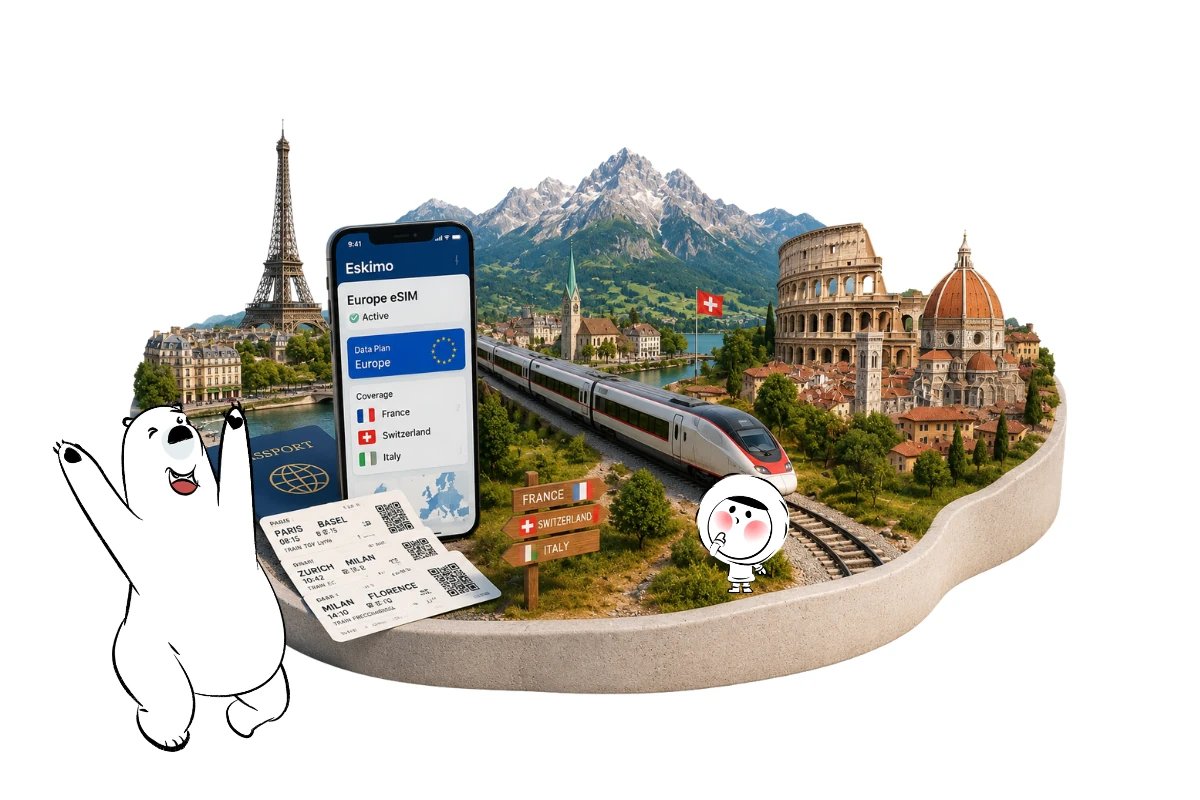
The best eSIM for Europe should cover every country on your itinerary, provide enough data for the trip, work with your device, and avoid forcing you to install a new eSIM whenever you cross a border. For multi-country trips, the Eskimo Europe eSIM is one option because a single regional plan currently covers 44 European countries.
On a route from France to Switzerland and then Italy, the same Eskimo eSIM can remain installed while your phone moves between eligible partner networks. The connection may pause briefly during a network handoff, but you normally do not need to buy or activate another eSIM after entering each supported country.
That does not mean coverage is uninterrupted everywhere. Railway tunnels, mountain valleys, rural roads, underground stations, and congested transport hubs can cause temporary signal loss even when the country itself is included in the plan.
What Makes an eSIM a Good Choice for Europe?
There is no single mobile-data option that is best for every European trip. The right choice depends on how many countries you are visiting, how long you will travel, how much data you expect to use, and whether your existing mobile plan already includes affordable European roaming.
A regional eSIM is particularly useful when an itinerary crosses several countries. Instead of arranging a local SIM or country-specific eSIM at each stop, you can use one compatible plan across its supported destinations.
Before choosing an eSIM for Europe, compare:
- Countries included in the plan
- Data allowance and validity
- Fixed versus unlimited options
- Hotspot requirements
- Device compatibility
- Whether unused data expires
- Activation and installation requirements
- Your home carrier’s European roaming charges
Home-carrier roaming can be convenient if your existing plan already includes your destinations at a reasonable rate. Local SIM cards can also make sense for a long stay in one country. For a trip involving several European countries, however, a regional eSIM can reduce the number of SIMs and data plans you need to manage.
The same logic applies to travelers building lower-cost multi-country itineraries. Eskimo’s list of budget-friendly countries in Europe includes destinations across Central, Eastern, and Southern Europe that can be combined into longer cross-border trips.
Eskimo is particularly suited to this multi-country use case because its Europe plan combines eligible destinations under one regional plan. The important limitation is that travelers should still check the current country list before buying rather than assuming every destination described geographically as Europe is included.
How Eskimo eSIM Works Across European Borders
An eSIM is a digital SIM profile stored on a compatible phone. With Eskimo, the profile can be installed once and used with eligible Country, Regional, or Global data plans.
When you enter another supported country, your phone searches for an available Eskimo partner network. It then attempts to register on that network and resume mobile data service.
Consider this rail itinerary:
- Paris to Basel
- Basel to Zurich
- Zurich to Milan
- Milan to Florence
A suitable Eskimo Europe data plan can remain on the same eSIM throughout the route when each destination is included. There is no need to find a mobile shop in Switzerland or install another profile before entering Italy.
The phone may take a few moments to register after crossing a border. A short interruption can therefore be part of the network handoff rather than evidence that the eSIM has stopped working.
For travelers building sightseeing into a multi-country route, many of the most famous landmarks in Europe are located in major cities connected by international rail, making one regional data setup particularly practical for navigation, tickets, and onward transport.
Why Schengen Does Not Define eSIM Coverage
The Schengen Area and mobile coverage are separate systems.
The European Commission’s Schengen information confirms that the Schengen Area currently includes 29 countries. It includes non-EU countries such as Switzerland, Norway, Iceland, and Liechtenstein, while Ireland is an EU member but does not participate in the Schengen Area.
Schengen primarily concerns movement across participating countries and their common external borders. It does not determine which destinations a regional eSIM provider includes.
Before purchasing an eSIM for Europe, compare the plan’s current destination list with your entire itinerary, including:
- Main destinations
- Airport stopovers
- Overnight train routes
- Day trips into neighboring countries
- Islands and overseas territories
- European countries outside the EU, such as Switzerland
The island point deserves particular attention. Trips involving the best European islands to visit, such as Sicily, Sardinia, Crete, Malta, Madeira, or Tenerife, can involve flights, ferries, and different national territories, so checking the actual plan coverage matters more than relying on a broad geographic label.
A journey can therefore remain within the Schengen Area while still moving between different mobile networks and roaming arrangements.
Why EU Roaming Rules May Not Protect International Visitors
The EU’s Roam Like at Home rules allow eligible customers of participating European mobile operators to use their domestic mobile services while temporarily traveling in covered countries, subject to fair-use rules and certain safeguards.
Those protections do not automatically apply to someone arriving with a mobile plan from Indonesia, Singapore, Australia, the United States, or another market outside the regulated roaming area. Their home carrier may instead use daily roaming passes, destination-based packages, or other international rates.
Switzerland deserves particular attention. Although Switzerland belongs to the Schengen Area, it is outside the regulated EU/EEA Roam Like at Home system. A mobile operator can voluntarily include Switzerland in its roaming package, but travelers should not assume that EU roaming terms automatically extend there.
That makes a France-Switzerland-Italy itinerary a useful example of why border rules, EU membership, and mobile roaming coverage should not be treated as the same thing.
Using an Eskimo Europe eSIM provides a prepaid alternative with a defined data allowance or plan structure. You can also keep your home SIM available for calls or verification messages while directing mobile data through Eskimo.
For current EU roaming rules and participating destinations, check the European Commission’s roaming information before traveling.
Setting Up Eskimo Before Departure
Install the Eskimo eSIM before leaving home while you have reliable Wi-Fi. Early installation gives you time to confirm device compatibility and review the necessary settings without depending on airport or station Wi-Fi.
Eskimo provides dedicated instructions for installing an eSIM on an iPhone or iPad and setting up an eSIM on Android.
After installation, check these settings:
- Select Eskimo as the mobile data line.
- Enable data roaming for the Eskimo eSIM when required.
- Disable data roaming for your home SIM.
- Turn off Cellular Data Switching or automatic data switching.
- Keep automatic network selection enabled.
- Leave the home SIM active only if you need calls, SMS, or verification codes.
On an iPhone, these controls are generally under Settings > Cellular or Mobile Service. Android menu names vary by manufacturer and software version, but the options are commonly found under SIM Manager, Mobile Network, or Network and Internet.
Get Eskimo eSIM to stay connected globally
Need internet while travelling? Here's what we recommend:

Fixed data plans
- No speed reduction
- No expiry, keep your data forever
- Transfer data to anyone
- Personal hotspot


What Happens on a Cross-Border Train
Your Eskimo eSIM remains installed when a train crosses a national border. The phone disconnects from the previous network, searches for an eligible network in the new country, and attempts to register again.
This can happen without any action from the traveler. Mobile data may nevertheless pause briefly while the network connection changes.
Terrain can cause a longer interruption than the border itself. Cross-border rail routes can pass through:
- Long tunnels
- Alpine valleys
- Underground platforms
- Remote countryside
- Areas between towns with fewer mobile towers
On a journey from Paris to Zurich, for example, your phone may change networks around the international border and later lose reception inside railway tunnels. The Zurich to Milan journey crosses mountainous terrain where temporary dead zones can occur independently of the eSIM provider.
Before boarding a long cross-border journey, download essential information such as:
- Digital rail tickets
- Seat reservations
- Hotel addresses
- Offline maps
- Passport or visa documents
- Transfer instructions
- Emergency contact details
A temporary loss of reception does not necessarily mean the Eskimo plan has stopped working. Your phone may reconnect after leaving a tunnel or reaching an area served by an eligible partner network.
Fixing Eskimo Mobile Data After a Border Crossing
Give the phone a minute or two to register after entering another country. If mobile data does not return, start with a simple network refresh.
Try these steps in order:
- Turn airplane mode on for around 10 seconds, then turn it off.
- Confirm that Eskimo remains selected as the mobile data line.
- Check that data roaming is enabled for Eskimo.
- Make sure data roaming remains disabled for the home SIM.
- Restart the phone.
- Confirm that network selection is set to automatic.
- Move outdoors if you are underground or inside a large station.
Manual network selection should generally be a later troubleshooting step. Selecting an unsupported operator can prevent the eSIM from registering correctly.
A connection problem can also be caused by weak local reception, network congestion, exhausted data, incorrect device settings, or entering a country that is not included in the selected plan.
Choosing the Right Eskimo Europe Data Plan
The best eSIM for Europe depends partly on how much mobile data you actually need.
Start by confirming that the current Eskimo Europe plan covers every destination on your route. The Europe plan currently covers 44 countries, but coverage can change, so check the destination list before purchasing.
Next, estimate your likely usage.
Light use generally includes messaging, email, occasional navigation, digital tickets, and basic travel searches.
Moderate use can include daily navigation, restaurant and attraction bookings, regular social media, music streaming, and some cloud photo backups.
Heavy use can include video streaming, video calls, frequent hotspot use, large file transfers, and high-resolution photo or video uploads.
Downloading city maps, translation packs, entertainment, and rail apps over Wi-Fi can reduce mobile-data consumption during long travel days.
Eskimo currently offers both fixed and unlimited options on its Europe plan page. Fixed data plans do not expire, so unused fixed data can remain available for another eligible trip rather than disappearing at the end of a short holiday.
Unlimited plans work differently from fixed data plans and have their own usage periods after activation. Check current plan sizes, supported countries, network availability, prices, and unlimited-plan conditions before purchasing.
Keeping Your Home SIM Without Using Its Data
A dual-SIM phone can keep your regular number active alongside Eskimo.
This can be useful for:
- Bank verification codes
- Airline notifications
- Calls to your regular number
- SMS from accommodation providers
- Account security messages
The important step is separating voice service from mobile data.
Set Eskimo as the data line and disable data roaming on the home SIM. Also turn off automatic data switching, which can allow the phone to fall back to your home carrier when the Eskimo connection is temporarily weak.
Receiving SMS while abroad may be free with some carriers, but policies vary. Calls, outgoing messages, voicemail, and other services may still generate roaming charges, so check your carrier’s international roaming policy before departure.
Is Eskimo a Good eSIM for Multi-Country Europe Travel?
Eskimo is particularly relevant for travelers whose priority is using one regional data plan across multiple eligible European destinations.
That makes it useful for itineraries such as France-Switzerland-Italy, multi-country rail journeys, European road trips, cruises with several European stops, or trips combining multiple cities across national borders.
Its advantages are less important for every type of traveler. Someone spending several months in one country may prefer to compare local mobile plans, while a traveler whose home carrier already provides affordable European roaming may not need a separate travel eSIM.
The decision should therefore come back to your itinerary. Check country coverage, expected data consumption, device compatibility, and your existing roaming costs before choosing.
For travelers who want prepaid data across several supported European countries without installing a different eSIM at every border, Eskimo provides a practical regional option.
Using Eskimo Mobile Data Across Europe
Mobile data can help with digital train tickets, live platform changes, hotel directions, translation, restaurant reservations, attraction bookings, and local transport apps throughout a cross-border itinerary. Reception is generally stronger in populated areas and along major transport corridors, while railway tunnels, mountain regions, rural roads, and underground stations may interrupt the connection.
The Eskimo Europe eSIM currently covers 44 European countries under one regional plan. Eskimo’s overall network coverage extends across 175 countries, which can be useful for travelers continuing beyond Europe or planning future international trips. No-expiry fixed data can remain available for another eligible journey if you do not use the full allowance during your European trip.
New users can also claim a free 250MB Global eSIM.
FAQs:
What is the best eSIM for Europe?
The best eSIM for Europe depends on your itinerary, data needs, device, and existing roaming plan. For a multi-country journey, a regional eSIM can be useful because one plan can cover several supported destinations. Eskimo’s Europe plan currently covers 44 countries.
Can Eskimo eSIM work in several European countries?
Yes. An Eskimo Europe plan can provide mobile data across multiple eligible European countries using the same installed eSIM. Always check the current country list before purchasing.
Do I need another Eskimo eSIM after crossing a border?
Usually not. Your phone should search for an eligible partner network in the new country while the same Eskimo eSIM remains installed. A brief interruption can occur while the network connection changes.
Does EU roaming include Switzerland?
Not automatically. Switzerland is part of the Schengen Area but is outside the regulated EU/EEA Roam Like at Home system. Some carriers voluntarily include Switzerland in their roaming packages, so check your provider’s terms before traveling.
Why is my Eskimo eSIM not reconnecting after a border crossing?
Your phone may still be searching for an eligible network, or local reception may be weak. Toggle airplane mode, confirm that Eskimo is selected for mobile data, check roaming settings, and keep network selection on automatic. Tunnels, mountains, underground stations, and local network conditions can also delay reconnection.